

Piper Experience Overview
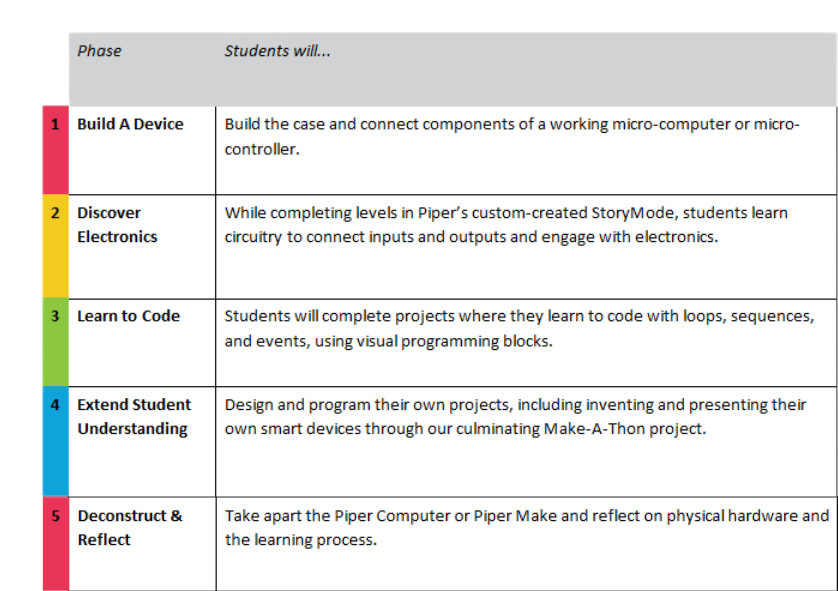
The Piper Experience is sequenced in 5 phases:
What Does Piper Focus On?
Encouraging Project Based Learning and Positive Student Outcomes
The Piper Curriculum offers lesson plans that are aligned to STEAM standards such as NGSS, K12 Computer Science Framework, Next Generation Science Standards and Common Core. Teachers will be able to use Piper starting as early as 3rd grade. The Piper Education experience, however, is primarily implemented in grades 3-8 with some implementations in lower and higher grade levels. The Piper experience includes:
- Engaging in mechanics, electronics, and software concepts
- Gateway to computer science pathways
- Engaging in the maker movement
- Project-based and Inquiry-based practices
- Student-centered learning experience
- Developing 21st Century skills
Following the experience, students will know and be able to do the following:
- Interpret an engineering blueprint with exploded diagrams
- Build a fully functional computer or smart device utilizing a microcontroller
- Connect circuits and electronics by solving challenges to create physical devices using simulations in Piper’s custom-created Raspberry Pi Edition of Minecraft
- Complete projects and learn coding principles in block-based language
- Learn to transition from block-based (Google for Education’s Blockly) to text-based programming (Python)
- Explore computational thinking practices by completing prompts, creating code, or debugging and remixing base projects
The Piper experience is scaffolded so that students can progress from simple to complex computer science concepts and skills. In addition to STEM learning, students will also practice:
- Self-regulation with project-based learning
- Reflection of learning with key electronics and programming understandings
- Experience new computational concepts with a growth mindset and hands-on learning
- Practice problem solving, critical thinking, and effective collaboration
Encouraging Productive Struggle
Since the Piper computer program is student-centered, students are challenged to explore and learn on their own with guidance and facilitation rather than direct instruction. This leads to growth and development of grit and perseverance in students with productive struggle. The added benefit of student collaboration in these moments of dissonance also leads to greater learning outcomes and a positive classroom community.
Where Does Piper Fit into Instructional Programs?
Piper has been used in Makerspaces, after-school programs, enrichment programs, camps, libraries, science centers, engineering clubs, GATE programs, Saturday school programs, and elementary and middle school classes during the regular scheduled school day. Each educational setting can support the use of the Piper Education experience. Piper provides professional development, training, and support to ensure your program is a success regardless of the learning environment.
Professional Development Overview
Our goal is to empower educators to effectively teach STEAM and computer science with confidence. Piper offers professional development sessions that focus on:
- Using the Piper experience to kickstart computer science learning, passion, and growth
- Digital Fluency and 21st Century Skills for all students
- Teaching with constructivism through facilitation
- Productive Struggle in connecting circuitry and programming electronics
- Fostering creativity with coding projects and design thinking
Professional Development sessions are conducted online with live, interactive, and personalized webinars. Further follow-up training is offered for addition teacher success and content knowledge development. The sessions are blended with the opportunity for leaders to learn directly, experientially, and visually. This training provides teacher-leaders with the tools they need to prepare to use Piper in their classrooms or to train other staff to ensure positive student outcomes in STEAM.
Professional Development Options:
- 1 hour of live, customized, online professional development to help teachers feel confident getting started
- Train-the-trainer model where educators become leaders to foster relations between educators implementing Piper in their communities
- For district implementations, we conduct 1-2 days of in-person professional development that is more intensive to serve the needs of all educators in teaching STEM with Piper
In summary, Piper focuses on three areas:
- Mechanics: students physically build a working computer that includes physical hardware and tools by reading visuals on an engineering blueprint
- Electronics: students learn about circuitry, the basics of electric current, breadboards, and electronic components with Piper’s custom-created Pi Edition of Minecraft
- Programming: students use the Piper Computer to learn to code with PiperCode built on Google Blockly and learn the connection between block-based and text-based languages
These three primary areas are integrated into the 5 phases of the Piper Education program. The curriculum is standards-aligned with a plethora of support materials for educators. To support teacher professional development, sessions are conducted through interactive training with a video series to offer additional teacher success and content knowledge development. The sessions are blended with the opportunity for leaders to learn directly, experientially, and visually. Finally, Piper can be used flexibly during a semester or throughout the year in many different educational settings.